VLSI Design Flow
End-to-end RTL to GDSII industry-standard design methodology
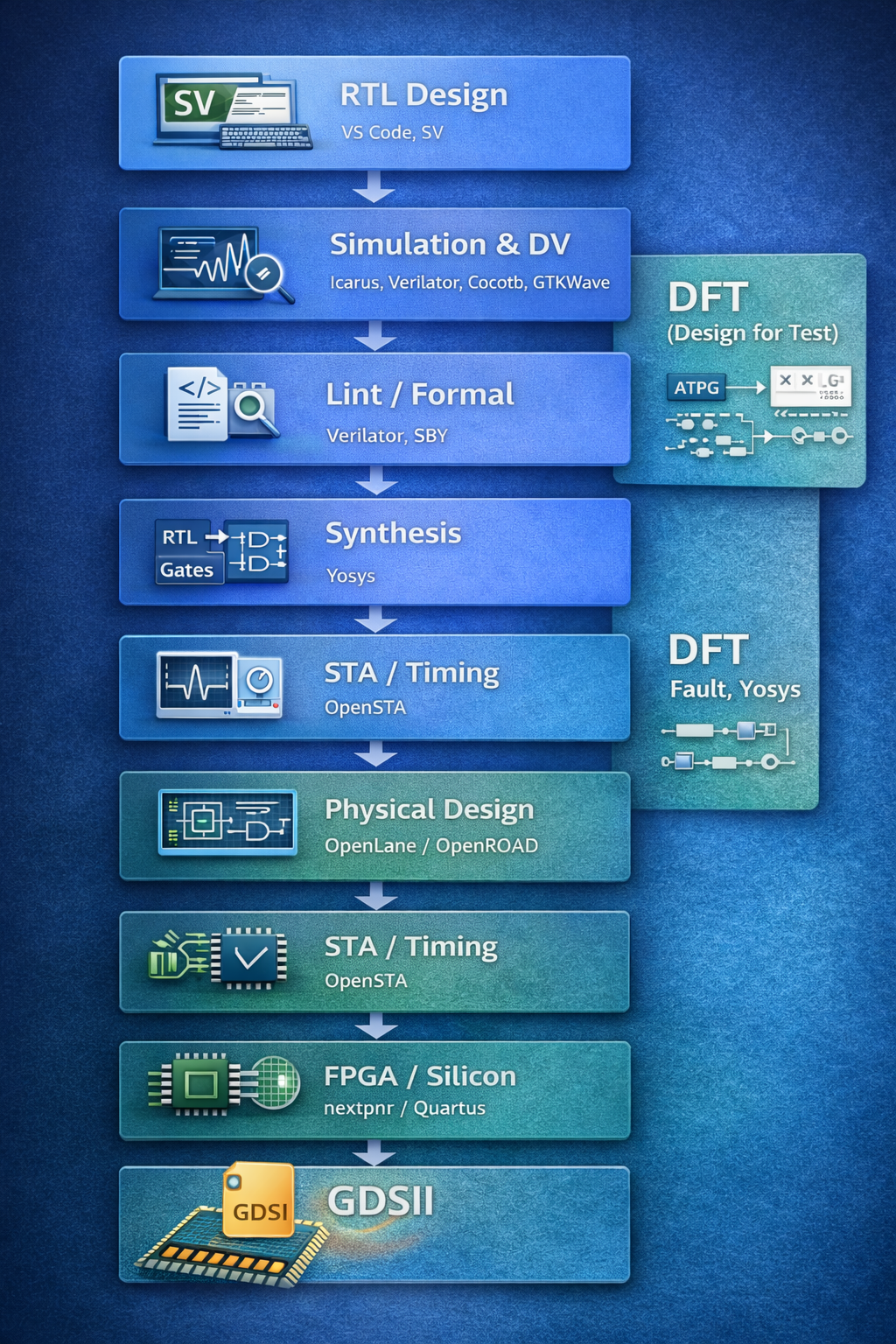
End-to-End RTL → GDS → DFT flow with industry-relevant open-source tools
Modern chip design relies on a well-integrated toolchain across multiple stages — from RTL coding to verification, synthesis, DFT, physical implementation, and sign-off.
At Chip Design Academy, we emphasize industry-relevant open-source tools that allow students and engineers to:
Complete RTL to GDS pipeline with open-source tools
⭐⭐⭐⭐⭐ (Recommended) - Full RTL-to-GDS flow support
⭐⭐⭐ - Limited open-source tool support
⭐⭐⭐ - Basic tools with some limitations
End-to-end RTL to GDSII industry-standard design methodology
Modular installation scripts for different toolchains
#!/bin/bash
echo "=== Installing RTL Design Basics Tools ==="
echo ""

# Update package list
echo "Updating package list..."
sudo apt update

# Install essential tools
echo "Installing essential build tools..."
sudo apt install -y \
    git \
    make \
    gcc \
    g++ \
    curl \
    wget \
    unzip

# Install RTL simulation tools
echo "Installing RTL simulation tools..."
sudo apt install -y \
    iverilog \
    verilator \
    gtkwave

# Install VS Code (optional)
echo "VS Code: Download from https://code.visualstudio.com"

echo ""
echo "✅ RTL Design tools installed successfully!"
echo "To verify installation, run: iverilog --version"#!/bin/bash
echo "=== Installing RTL Verification Tools ==="
echo ""
# Update and install base tools
echo "Updating system and installing base tools..."
sudo apt update
sudo apt install -y \
git \
make \
gcc \
g++ \
verilator \
gtkwave
# Install Yosys for formal verification
echo "Installing Yosys..."
sudo apt install -y yosys
# Install Python and verification libraries
echo "Installing Python and verification tools..."
sudo apt install -y \
python3 \
python3-pip \
python3-venv \
python3-dev
# Install Cocotb for Python-based verification
echo "Installing Cocotb..."
pip3 install cocotb
# Install SymbiYosys for formal verification
echo "Installing SymbiYosys..."
git clone https://github.com/YosysHQ/sby.git
cd sby && sudo make install
cd ..
echo ""
echo "✅ RTL Verification tools installed!"
echo "To verify: python3 -c \"import cocotb; print('Cocotb OK')\""#!/bin/bash
echo "=== Installing Synthesis & STA Tools ==="
echo ""
# Update system
echo "Updating package list..."
sudo apt update
# Install Yosys for RTL synthesis
echo "Installing Yosys..."
sudo apt install -y yosys
# Install OpenSTA for Static Timing Analysis
echo "Installing OpenSTA..."
sudo apt install -y \
opensta \
tcl \
tcl-dev \
tcllib
# Install additional utilities
echo "Installing additional utilities..."
sudo apt install -y \
libreadline-dev \
libffi-dev \
graphviz
# Verify installation
echo "Verifying installations..."
yosys --version
sta --version 2>/dev/null || echo "OpenSTA installed"
echo ""
echo "✅ Synthesis & STA tools installed!"
echo "Try: yosys -p 'help'"#!/bin/bash
echo "=== Installing Physical Design Tools ==="
echo ""
# Update system
echo "Updating system..."
sudo apt update
# Install Docker for OpenLane
echo "Installing Docker..."
sudo apt install -y \
docker.io \
docker-compose
# Start and enable Docker
echo "Configuring Docker..."
sudo systemctl enable docker
sudo systemctl start docker
# Add user to docker group (requires re-login)
echo "Adding user to docker group..."
sudo usermod -aG docker $USER
# Install layout tools
echo "Installing layout viewing tools..."
sudo apt install -y \
magic \
klayout \
netgen
# Clone OpenLane for RTL to GDS flow
echo "Cloning OpenLane..."
git clone https://github.com/The-OpenROAD-Project/OpenLane.git
cd OpenLane
# Make the OpenLane installation
echo "Building OpenLane..."
make
echo ""
echo "✅ Physical Design tools installed!"
echo ""
echo "⚠️ IMPORTANT: Re-login or restart for Docker group changes"
echo "After re-login, test: docker --version"
echo "OpenLane directory: $(pwd)"#!/bin/bash
echo "=== Installing FPGA Open-Source Flow ==="
echo ""
# Update system
echo "Updating package list..."
sudo apt update
# Install FPGA open-source toolchain
echo "Installing open-source FPGA tools..."
sudo apt install -y \
yosys \
nextpnr-ice40 \
nextpnr-ecp5 \
fpga-icestorm \
fpga-trellis \
fpga-xc3sprog
# Install programming tools
echo "Installing programming tools..."
sudo apt install -y \
udev \
fxload \
libftdi1-2 \
libftdi1-dev \
libusb-1.0-0-dev
# Install Python tools for FPGA
echo "Installing Python FPGA tools..."
pip3 install \
apio \
pyserial \
ftdi1
# Create udev rules for FPGA boards
echo "Setting up udev rules for FPGA boards..."
sudo tee /etc/udev/rules.d/99-fpga.rules > /dev/null << EOF
# IceStorm
SUBSYSTEM=="usb", ATTR{idVendor}=="0403", ATTR{idProduct}=="6010", MODE="0666"
SUBSYSTEM=="usb", ATTR{idVendor}=="0403", ATTR{idProduct}=="6014", MODE="0666"
EOF
sudo udevadm control --reload-rules
echo ""
echo "✅ FPGA open-source tools installed!"
echo "Test: yosys --version && nextpnr-ice40 --version"#!/bin/bash
echo "=== Installing Embedded & IoT Tools ==="
echo ""
# Update system
echo "Updating package list..."
sudo apt update
# Install Arduino IDE and tools
echo "Installing Arduino IDE..."
sudo apt install -y \
arduino \
arduino-core \
arduino-mk
# Install serial communication tools
echo "Installing serial tools..."
sudo apt install -y \
minicom \
screen \
picocom \
cutecom
# Install Python for IoT
echo "Installing Python and IoT libraries..."
sudo apt install -y \
python3 \
python3-pip \
python3-venv \
python3-serial
# Install IoT protocols and libraries
echo "Installing IoT libraries..."
pip3 install \
paho-mqtt \
flask \
flask-socketio \
requests \
numpy \
pandas
# Install build tools
echo "Installing build tools..."
sudo apt install -y \
gcc-arm-none-eabi \
gdb-arm-none-eabi \
openocd \
stlink-tools
# Install platformio for embedded development
echo "Installing PlatformIO..."
pip3 install platformio
echo ""
echo "✅ Embedded & IoT tools installed!"
echo "Arduino IDE: Menu → Programming"
echo "Test: python3 -c \"import paho.mqtt.client; print('MQTT OK')\""#!/bin/bash
echo "=== Installing Robotics Tools ==="
echo ""
# Update system
echo "Updating package list..."
sudo apt update
# Install Arduino for robotics control
echo "Installing Arduino..."
sudo apt install -y \
arduino \
arduino-mk
# Install Python for robotics
echo "Installing Python and scientific libraries..."
sudo apt install -y \
python3 \
python3-pip \
python3-venv \
python3-numpy \
python3-matplotlib \
python3-scipy
# Install robotics-specific Python libraries
echo "Installing robotics libraries..."
pip3 install \
pyserial \
opencv-python \
opencv-contrib-python \
pygame \
pyside6 \
pyqt5
# Install ROS2 (optional - for advanced robotics)
echo "For ROS2 (Robot Operating System 2):"
echo "Visit: https://docs.ros.org/en/humble/Installation.html"
echo ""
echo "For basic robotics, above tools are sufficient."
# Install simulation tools
echo "Installing robotics simulation tools..."
sudo apt install -y \
gazebo \
ros-humble-desktop \
rviz2
# Install communication tools
echo "Installing communication tools..."
sudo apt install -y \
minicom \
mosquitto \
mosquitto-clients
echo ""
echo "✅ Robotics tools installed!"
echo ""
echo "For ROS2 installation (optional):"
echo "Follow: https://docs.ros.org/en/humble/Installation/Ubuntu-Install-Debians.html"#!/bin/bash
echo "=== Complete Chip Design Academy Toolchain Setup ==="
echo "This will install ALL tools for RTL, FPGA, Embedded & Robotics"
echo "Estimated time: 45-60 minutes"
echo ""
read -p "Continue? (y/n): " -n 1 -r
echo
if [[ ! $REPLY =~ ^[Yy]$ ]]
then
echo "Setup cancelled."
exit 1
fi
# Run all individual scripts
SCRIPTS=(
"rtl_basics.sh"
"rtl_verification.sh"
"synthesis_sta.sh"
"physical_design.sh"
"fpga_flow.sh"
"embedded_iot.sh"
"robotics.sh"
)
for script in "${SCRIPTS[@]}"; do
if [ -f "$script" ]; then
echo ""
echo "=== Running $script ==="
bash "$script"
echo "=== Finished $script ==="
else
echo "⚠️ Script $script not found, skipping..."
fi
done
echo ""
echo "========================================"
echo "✅ COMPLETE TOOLCHAIN SETUP FINISHED!"
echo "========================================"
echo ""
echo "Next steps:"
echo "1. Re-login for Docker group changes"
echo "2. Test installations with provided commands"
echo "3. Refer to course materials for tool usage"Click "Download" on individual scripts or "Download All" for complete package
chmod +x script_name.sh./script_name.shSome scripts may require sudo password or user confirmation
Includes all 7 scripts + README + master installer (ZIP, 5KB)
Download our complete toolchain setup scripts and get started with industry-relevant tools today.